Security and Compliance
This section describes the Foglight security features. This document includes information about Foglight access control, data protection, and secure network communication. It also describes how Foglight security features meet the National Institute of Standards and Technology (NIST) recommended federal information security standards as detailed in the Federal Information Security Management Act (FISMA).
This section is intended for system administrators and other users concerned with the Foglight security features.
This section covers the following key areas:
- Security and Compliance
- Security overview
- Foglight security measures
- Customer security measures
- Security features in Foglight
- Protection of data collection infrastructure
- Protection of stored data
- Protection of communicated data
- Web application security
- Communication between Management Server and agents
- Communication between Management Server and clients
- Communication between Management Server and XML over HTTP(S) agents
- Communication between Management Server and repository database
- SSH Communication between Agents and monitored resources
- Network ports
- Additional security features
- FIPS-compliant mode
- Usage feedback
- Appendix: FISMA compliance
Security overview
This section provides an overview of how Foglight manages information security. It presents the Foglight security measures and Customer security measures at a high level, and then describes the Security features in Foglight.
Foglight security measures
Foglight provides detailed insight into the service relationships of end users, business and IT services, as well as applications and databases. Intuitive and flexible dashboards can be customized to provide multiple models and views of the managed environment.
Foglight consists of the Foglight Management Server (FMS), a database repository, and a set of cartridges. Foglight relies on a browser-based user interface and is controlled via role assignments in the Foglight security model. The Foglight Web application runs in an Apache Tomcat server. Users interact with the FMS Web application via an HTTP or HTTPS connection.
Individual cartridges can be installed on the Management Server to provide monitoring capabilities for a variety of different end systems, including database and Web application servers. Cartridges contain agents that are typically deployed on the monitored systems. Some cartridges may contain agents that are deployed locally on the Management Server. These agents collect monitoring data and report it back to the Management Server. Users can then access this data in various forms.
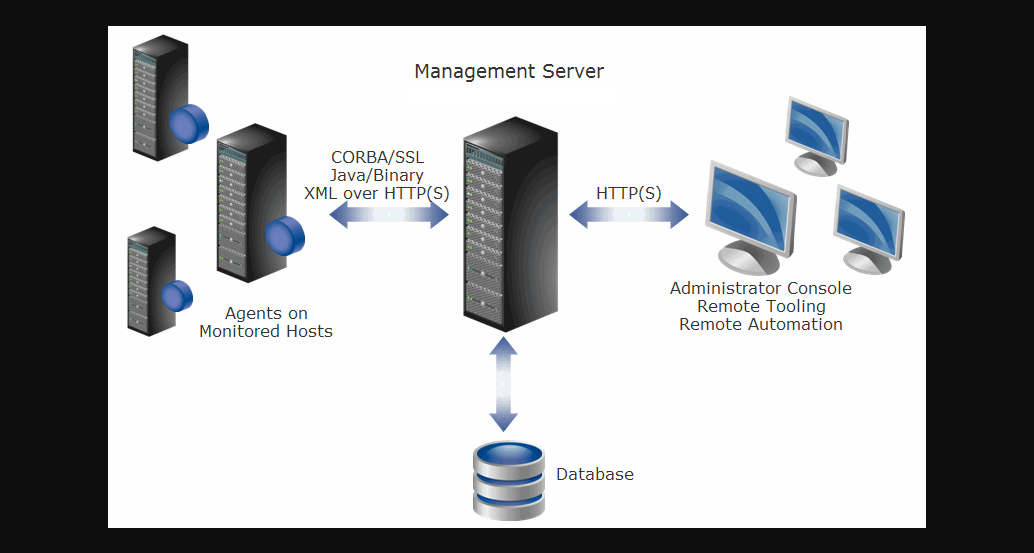
Overview of interaction between Foglight components
Customer security measures
Foglight security features are only one part of a secure environment. The customer’s operational and policy decisions have a great influence on the overall level of security. In particular, the customer is responsible for the physical security of Foglight and its network. Administrators should change default passwords and replace them with strong passwords of their choice.
Security features in Foglight
The following sections describe the features provided by Foglight. This document does not address security features for individual Foglight cartridges. Please refer to a specific cartridge’s security and compliance document for this information.
If your environment includes APM appliances, review Trust model after you finish this section.
Service accounts
Foglight manages login credentials for the following service and user accounts:
- Foglight Users - Foglight supports both internal and external users. Internal users are defined within Foglight while external users are mapped from one of the LDAP-compatible directory services supported by Foglight (Active Directory, Oracle Directory Server Enterprise Edition, and OpenLDAP).
- LDAP Directory - For Foglight to access an LDAP directory, the customer needs to provide LDAP service-account credentials (user name and password for an account with read access to the directory).
- Foglight Management Server Database Repository - Foglight supports using specific versions of MySQL, Oracle, and Microsoft SQL Server databases for its storage repository. The login credentials for a database administrator account are specified during Foglight installation. For customers who do not provide a database administrator account, the creation of the external database may be delayed, as the database will require manual configuration.
Agent credentials
When installing Foglight cartridge agents it is typically necessary to enter credentials for the user accounts that are on the monitored resources, including the host and database. These credentials are entered through the agent configuration properties via the Foglight Administration Console and give an agent access to applications or operating systems on the monitored hosts.
The Management Server includes a central credential service that manages cartridge agent credentials. A lockbox contains a set of credentials and keys for their encryption and decryption. Releasing a lockbox to a credential client enables the client to release the credentials to the agent instances managed by that client, thereby granting the agent instances access to the monitored system.
Each Foglight cartridge may mark specific properties (for example, user names and passwords) of its agents as being sensitive. Such properties are given additional protection as described in Protection of stored data.
Foglight users and groups
There are two types of users in Foglight: internal and external users. Internal users are created using the Foglight Administration Console. External users are mapped from one of the LDAP-compatible directory services supported by Foglight. All Foglight users are authenticated upon login, based on their user names and passwords.
Foglight includes one default internal user (foglight) with administrative access, and four default internal groups (Cartridge Developers, Foglight Administrators, Foglight Operators, and Foglight Security Administrators), none of which can be deleted.
Change all default passwords immediately after installation.
Role-based access control
Foglight security model is based on a role-based access control system (RBAC).
| Term | Definition | Use in Foglight |
|---|---|---|
| Permission | Permissions grant users a certain level of access to a configuration item, enabling them to perform specific actions using Foglight. These permissions do not apply to monitored information. | A different set of permissions can be configured for each role or user who has been granted access to a configuration item. |
| Role | The default roles included with Foglight dictate the actions that users can perform with Foglight features or components. Foglight System Administrators can also create custom roles. | Roles are assigned to groups. Users in a group have the roles that are assigned to that group. Roles can also be associated with specific configuration items. |
| User | A user has a username and a password and can belong to one or more groups. | A user logging in to Foglight is authorized to perform a certain set of actions based on the roles that have been assigned to the user’s groups. |
| Group | A group can contain one or more users or other groups. Roles are assigned to users through groups. | You can assign roles and add users to groups. |
| Configuration Item | A configuration item such as a rule or registry variable. | Access to configuration items can be assigned to specific users or to roles. Each configuration item is initially owned by its creator. |
Roles dictate the actions that a user can perform. There are two types of roles in Foglight: default roles (called built-in roles), and custom roles (called internal roles).
Foglight defines a configuration item as an item that is created and/or managed in the Administration Console, such as a rule, registry variable, derived metric, or schedule. Access to individual configuration items can be restricted to specific users or roles. In addition, the level of access that each user or role has to that configuration item can be controlled through permissions.
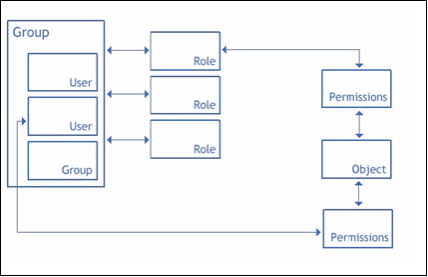
Relationships between users, groups, roles, permissions, and configuration items
Users who have the Foglight Security Administrator role can use the Foglight Administration dashboard to manage users, groups, roles, permissions, and configuration items.
Password policies
Listed below are the default restrictions that apply to passwords for administrators (Foglight users with the Foglight Security Administrator role), for internal users, and for credential lockboxes.
- An internal user’s password expires after ninety (90) days.
- An administrator’s password expires after forty-five (45) days. The one exception is the password for the default user foglight, which does not expire.
- Users are locked out of the system for fifteen (15) minutes after they enter an incorrect password for five (5) consecutive login attempts.
- Foglight reminds users fifteen (15) days before their password expires.
- The password must be at least seven (7) characters long, and must contain both alphabetic and numeric characters.
- The password cannot be:
- the same as the user name
- the repetition of a single character
- longer than twenty (20) characters
- the same as any of the user’s last twelve (12) passwords
Users with the Foglight Security Administrator role can view and edit the configurable password policies on the Configure Password Settings dashboard in the Administration Console.
External users are subject to the password policies that are enforced on the operating systems that generated the user accounts.
Setting password complexity levels
The customer sets the enforcement complexity level passwords of credential lockboxes, internal users, and users with the Foglight Security Administrator role. The Lockbox password complexity level, the User password complexity level, and the Administrator password complexity level list are available from the Configure Password Settings dashboard and define the following levels of increasing complexity:
- Level 1: Passwords are not checked for complexity.
- Level 2: Passwords must contain both alphabetic and numeric characters.
- Level 3: Passwords must contain at least one upper case letter, lower case letter, and numeric character, as well as at least one character that is not alphanumeric.
By default, the complexity level for both internal users’ and administrators’ passwords is set to level 2. Administrators’ passwords cannot be set to level 1.
Required privileges
Installing Foglight Management Server
To install Foglight, administrative privileges on the target operating system are required. In addition, the customer is prompted to provide credentials for a database administrator account during installation. The need to enter such credentials can be bypassed as described in Manual database configuration.
Running Foglight Management Server
Foglight requires administrative privileges to configure the server to run as a service (a Windows service or a UNIX/Linux init.d script). Once it is configured, the service can be launched with a regular user account.
Manual database configuration
When installing the Foglight Management Server for use with an external database, the database can be set up later (that is, after the Management Server installation is complete). In this case, the database must be manually configured prior to starting the Management Server. This configuration requires executing the scripts in the <foglight_home>/scripts/sql directory. Some scripts must be run using an account with administrative privileges.
Controlling remote system access with credentials
Foglight can control access to specific elements of a monitored system through a built-in credential management system. If an organization has specific policies in place regarding system access, such policies can be implemented using credentials managed by the Management Server.
Foglight supports a set of commonly used credentials such as:
- Challenge Response
- Domain, User Name, and Password (Windows)
- Use Client’s Login at Connection Time
- User Name
- User Name and Password
Each credential can have one or more authentication policies associated with it, based on the desired usage count, failure rate, the time range during which the credential can be used, and the amount of time during which the credential information is cached locally. Credentials can apply to specific parts of the monitored environment, such as hosts and ports.
Foglight agents need access to this information when monitoring systems that require credential verification. Credentials are stored encrypted in lockboxes. Lockboxes are released to credential clients, such as agent managers. For more information about credential encryption, refer to Protection of stored data.
Protection of data collection infrastructure
Installation of data collection clients
There are many types of Foglight agents; most communicate with the Management Server through a provided client component - the Foglight Agent Manager (FglAM).
The Agent Manager can be installed without administrator access, but such access is required to enable startup scripts or Windows services to allow automatic launching of the Agent Manager upon machine reboot. The Agent Manager can be initially installed on a monitored host through an installer GUI, a text-based console installer, or a command-line silent mode (suitable for mass deployment using customer-provided tools).
Once installed, the Agent Manager component manages the life cycle of a number of hosted agents and provides a central communications link between those agents and the Management Server. Hosted agents and the Agent Manager can be upgraded from the Management Server using this central communications link.
Agents requiring privilege escalation
Some data collection agents hosted by the Agent Manager require administrator privileges to perform their assigned tasks. In order to avoid running the entire client host with the required privileges, Foglight uses a privilege escalation mechanism to create the required access for the agents that need it.
The Agent Manager, by default, uses the well known sudo facility (a very fine-grained configurable system) to implement privilege escalation. Sudo can be configured to allow only specific applications to be launched with escalated privileges, and the privileges provided to each launched application can be independently controlled. In addition, sudo allows the administrator to limit the parameters passed to each application; this facility is central to configuring a secure system with the Agent Manager.
The Agent Manager also provides an alternative setuid root-based launcher. This launcher is only intended for use in demonstration installations with minimal security needs, where the burden of properly configuring sudo for fine-grained access control would hinder a timely demonstration. Quest does not recommend that this setuid root-based launcher be configured as part of Foglight’s standard installation instructions.
Protection of stored data
The Foglight Management Server and Foglight cartridges use the Java Cryptographic Extension library for cryptographic operations.
For information about FIPS-compliant encryption modes, refer to FIPS-compliant mode.
Foglight Management Server encryption
The following table lists the encryption methods used by the Foglight Management Server for various types of data:
| Data | Encryption in normal mode | Encryption in FIPS-compliant mode | Remark |
|---|---|---|---|
| Foglight user Credential | MD5 for existing users migrated from Foglight 6.3.0 or earlier version. SHA256-bit for new or updated passwords. | SHA256-bit | Password is hashed with MD5 or SHA256 and the resulting digest is stored in Foglight database. User passwords are therefore not stored anywhere, in encrypted or in clear text form. |
| LDAP Credential | AES 256-bit | AES 256-bit | Using default Foglight encryption key. |
| Repository Database Credentials | AES 256-bit | AES 256-bit | Using default Foglight encryption key. |
| Agent Credentials | RSA 2048-bit | RSA 2048-bit | Using automatically generated RSA key as encryption key, the key is protected by lockbox password |
| Lockbox Credentials | AES 256-bit | AES 256-bit | Using default Foglight encryption key. |
| Sensitive data in ASP | AES 256-bit | AES 256-bit | Using default Foglight encryption key. |
| Database repository | - | - | Protected by user access control and database software. |
The default Foglight encryption key is stored in a Java keystore protected by a Foglight master password. Customers can change the encryption key after installation by using Foglight to generate a new key. It is recommended to change the default Java keystore password upon the installation of the Management Server. After changing the default key, re-entering the LDAP password is required. Then the key will be encrypted under the new key. After changing the password, the Management Server can no longer decrypt the existing cipher texts under the old key.
Foglight Agent Manager encryption
Foglight Agent Manager uses the Java Cryptographic Extension library for cryptographic operations. The following table lists the encryption methods used by the Agent Manager:
| Data | Encryption in normal mode | Encryption in FIPS-compliant mode | Remark |
|---|---|---|---|
| Keystore password | AES 256-bit | AES 256-bit | Using default Agent Manager encryption key for encrypting keystore passwords. |
| Agent Credential | RSA 2048-bit | RSA 2048-bit | Using the lockbox key for decrypting the agent credentials retrieved from Foglight Management Server. |
| DH Key Exchange | DH 1024-bit | DH 2048-bit | Using 2048-bit modulus to exchange DH session key between Foglight Management Server and Agent Manager. |
| Lockbox key | Triple DES 192-bit | AES 256-bit | Using the DH session key for encrypting or decrypting the lockbox key. |
| Agent Properties Cache | AES 256-bit | AES 256-bit | Encrypting or decrypting the cached agent properties data. |
Credentials for Foglight users
When an internal Foglight user account is created, the user’s password is hashed with the MD5 algorithm and the resulting digest is stored in the Foglight database. User passwords are therefore not stored anywhere, in encrypted or in clear text form.
LDAP credentials
LDAP server passwords are encrypted with AES 256-bit. A default 256-bit AES encryption key is used in all cases of installations of Foglight. This encryption key is stored in a Java keystore protected by a Foglight master password. Customers have the ability to change the encryption key after installation by using Foglight to generate a new key. Quest recommends customers change the default Java keystore password upon the installation of the Management Server.
Changing the default key requires the LDAP password to be re-entered so it can be encrypted under the new key (after a password change, the Management Server can no longer decrypt existing cipher texts under the old key).
Management Server repository database credentials
The login credentials for the database administrator account on the Foglight repository are encrypted in identical fashion as the LDAP credentials, using the same encryption key.
Foglight agent credentials
Foglight cartridges include agents that require access to service account login credentials on the systems or applications that they monitor. Foglight stores these credentials in the repository database which is protected by access control. Any agent property that is marked as sensitive is masked during display in user interface consoles.
All agent properties are stored encrypted in an XML configuration file on the monitored host.
Database repository
Collected data from Foglight agents is stored in the repository database, which is protected through user access control. This data contains collected metrics and statistics about the systems on the monitored hosts, as well as agent configuration parameters.
Protection of communicated data
Web application security
The Management Server’s Web application server supports the use of TLS, in order to protect Foglight users’ login credentials. Foglight provides its own self-signed TLS certificate on the Web application server, and enables customers to provide a replacement TLS certificate of their choice. TLS certificates are managed through the Java keystore on the Management Server.
Basic HTTP (non-TLS) access can be disabled by disabling the HTTP port on the server. This disables both HTTP access to the Management Server browser interface and HTTP communication for agents that use the XML-over-HTTP protocol, forcing the use of HTTPS connections.
Communication between Management Server and agents
Most Foglight agents communicate with the Management Server through the included client application, the Agent Manager. The exceptions are agents that use the low level XML over HTTP(S) data submission option. When activating an agent it is necessary to communicate its properties, which may include login credentials for accounts on the monitored host.
Communication between Management Server and clients
Foglight Agent Manager (FglAM) implements a communication layer with XML messages sent to the Management Server over HTTP(S). These messages are sent to the same ports that the Management Server uses for all HTTP-based traffic, including the Web applications.
The Agent Manager allows the user to configure HTTP or HTTPS URLs for the Management Server, or a combination of both. When HTTPS is used, the Agent Manager rejects invalid certificates by default - either self-signed, signed by an unrecognized certificate authority, or a certificate that declares a Common Name that does not match the Management Server host name (thus providing protection against man-in-the-middle attacks). Certificates can be added to the Agent Manager keystore. Like a Web browser, Agent Manager supports configuration options to relax these certificate verification controls, but these options will reduce the security provided by the TLS mechanism. If the Management Server is configured to only allow HTTPS access, the Agent Manager must be configured with an HTTPS URL to connect to the Management Server. By default, the Management Server uses the recommended cipher suites from the Open Web Application Security Project (OWASP). All default cipher suites are FIPS 140-2 compliant ciphers for its communication with the Agent Manager.
The Agent Manager supports concentrators. A concentrator is an Agent Manager instance that works similarly to an HTTP proxy. It is configured to accept connections from other Agent Manager instances (called downstream instances) and forward these connections to an upstream target, either the Management Server or another Agent Manager concentrator. These concentrators support HTTP or HTTPS communication with the upstream Management Server.
A concentrator’s upstream connection is independent of the downstream connections. For example, several Agent Manager instances on a local subnet can communicate to a concentrator using HTTP while the concentrator forwards requests over a non-secure network to the Management Server using HTTPS (or vice-versa).
Communication between Management Server and XML over HTTP(S) agents
The XML over HTTP(S) protocol is another low-level method for submitting data to the Management Server. TLS is supported for the XML over HTTP protocol in the default server configuration. An agent using this protocol simply needs to use the HTTPS server port (8443) to open secure connections.
Communication between Management Server and repository database
The Foglight repository database may be installed either on the same or separate server as the Management Server. Data is transmitted using the database communication protocol (of MySQL, Oracle, or SQL Server) between the Management Server and the repository database. The communication channel can be secured with TLS where supported by the database.
SSH Communication between Agents and monitored resources
Key Exchange Algorithms:
- curve25519-sha256
- curve25519-sha256@libssh.org
- curve448-sha512
- ecdh-sha2-nistp521
- ecdh-sha2-nistp384
- ecdh-sha2-nistp256
- diffie-hellman-group-exchange-sha256
- diffie-hellman-group18-sha512
- diffie-hellman-group17-sha512
- diffie-hellman-group16-sha512
- diffie-hellman-group15-sha512
- diffie-hellman-group14-sha256
- diffie-hellman-group14-sha1
- diffie-hellman-group-exchange-sha1
- diffie-hellman-group1-sha1
Host Key Algorithms:
- ecdsa-sha2-nistp256-cert-v01@openssh.com
- ecdsa-sha2-nistp384-cert-v01@openssh.com
- ecdsa-sha2-nistp521-cert-v01@openssh.com
- ssh-ed25519-cert-v01@openssh.com
- rsa-sha2-512-cert-v01@openssh.com
- rsa-sha2-256-cert-v01@openssh.com
- ecdsa-sha2-nistp256
- ecdsa-sha2-nistp384
- ecdsa-sha2-nistp521
- ssh-ed25519
- sk-ecdsa-sha2-nistp256@openssh.com
- sk-ssh-ed25519@openssh.com
- rsa-sha2-512
- rsa-sha2-256
- ssh-rsa
- ssh-dss
Ciphers:
- chacha20-poly1305@openssh.com
- aes128-ctr
- aes192-ctr
- aes256-ctr
- aes128-gcm@openssh.com
- aes256-gcm@openssh.com
- aes128-cbc
- aes192-cbc
- aes256-cbc
MAC algorithms:
- hmac-sha2-256-etm@openssh.com
- hmac-sha2-512-etm@openssh.com
- hmac-sha1-etm@openssh.com
- hmac-sha2-256
- hmac-sha2-512
- hmac-sha1
Network ports
The Foglight installation process allows you to configure port assignments. The default ports are displayed during installation.
For information about securing communications over these ports, refer to Protection of communicated data.
Default port assignments
The following table lists the default port assignments for the Foglight Management Server:
| Port Name | Port Number | Outgoing/Incoming |
|---|---|---|
| Embedded DB | TCP 15432 | Incoming/Outgoing |
| HTTP | TCP 8080 | Incoming |
| HTTPS | TCP 8443 | Incoming |
| High Availability | UDP 45566, TCP 7800 | Incoming/Outgoing |
| Federation RMI | TCP 1099 | Incoming/Outgoing |
| Federation RMI Service | TCP 4444 | Incoming/Outgoing (Note: If your Federation Master Server is installed behind the firewall, you must configure this port on the Federation Child Server to set up the connection with the server.) |
| QP5 | TCP 8448 | Incoming/Outgoing |
High Availability (HA) refers to running a secondary instance of Foglight as a failover backup server (redundant mode). Foglight listens to the multicast port (45566) only when configured for HA mode.
External database ports
| Port Name | Port Number | Outgoing/Incoming |
|---|---|---|
| External PostgreSQL | 5432 | Outgoing |
| Microsoft SQL Server | 1433 | Outgoing |
| Oracle | 1521 | Outgoing |
| MySQL | 3306 | Outgoing |
Agent adapter ports
| Port Name | Port Number | Outgoing/Incoming |
|---|---|---|
| Agent Manager | 8080 | Incoming |
| Agent Manager over TLS | 8443 | Incoming |
| Java EE Technology Agent | 41705 | Incoming |
Client communication
The Agent Manager connects to the Management Server using the same HTTP(S) ports as the browser interface. The Agent Manager uses the standard URL format to configure the address of the upstream Management Server; therefore if the port number is changed in the Management Server configuration, it is a simple matter to configure the Agent Manager to use the updated port.
Agent Manager instances that are configured to communicate through a concentrator can use any customer-designated port for their communication with that concentrator host. This needs to be configured on both the upstream and downstream Agent Manager instance.
Some agents hosted by the Agent Manager are run out-of-process, and use local TCP connections to communicate with the master Agent Manager process. Two protocols are used for this local communication: legacy RAPSD for agents which are supported by the Agent Manager, and the Agent Manager’s XML-over-HTTP for new agents implemented with the Agent Manager API (this is the same protocol used by the Agent Manager to connect to the upstream Management Server or concentrators). In both cases, the master Agent Manager process listens for local connections on an available port assigned randomly by the OS from the ephemeral port range. In both cases, these ports will only accept connections from localhost; neither case supports encryption for this local-only traffic.
Configuration parameters
The Foglight Management Server stores its configuration parameters in configuration files within the Foglight directory on the Management Server’s file system. When Foglight is launched, the parameters are read and cached internally; the configuration files on disk are not re-read until the Management Server restarts. This allows modification of the configuration files while Foglight is running without affecting real-time processing.
Additional security features
This section describes additional security features available in Foglight.
Audit log
From the Foglight Administration Console, users can select security and change audit logs for a specific time period and display those logs in the Audit Viewer.
The View Audit Information dashboard allows you to review these logs and to filter them to show information for a specific time span. It also lists users who have logged in to Foglight, changes to user, group or role settings, and changes made to configuration items, including rules, schedules, or registry variables.
The following information appears in each log entry in the table:
- Timestamp: displays the date, time, and time zone at which the specified action occurred.
- User Name: displays the user name for the user who caused the action to be performed.
- Service Name: displays the name of the Foglight service that performed the action.
- Operation Name: displays the operation that was performed by Foglight. If applicable, the name of the item that was changed is also displayed in this column.
Audit log entries are stored in the Foglight database.
A subset of the Foglight methods that are audited includes:
- start/stop data collection
- install/uninstall cartridge
- activate/deactivate cartridge
- delete rules
Log files
The following information is recorded in the Foglight log files on the Management Server:
- troubleshooting data (including warnings and errors)
- debug information
- life-cycle information
- agent information
No user names or passwords are stored in the log file. These files are stored unencrypted on the file system within the Foglight directory structure. Any system user with read privileges to these files can access the logs.
Masking sensitive input data
Foglight masks password entries with asterisks to prevent them from being displayed. Foglight also masks agent properties that are marked as sensitive.
Uninstalling Foglight
Uninstalling Foglight leaves certain files in the Foglight folder, and database content (schema) is not deleted. Only the internally embedded database is erased on uninstall. If required, the customer must delete the Foglight files from the file system manually.
IPv6
The Agent Manager supports IPv6 communication with the Management Server, and also with upstream Agent Manager concentrators.
Monitoring patches for the embedded database
Quest Software Inc. monitors and provides patches and/or upgrades to address any relevant vulnerabilities that may affect the embedded PostgreSQL database provided with Foglight. To receive product updates or security patches, a customer may be required to upgrade to the latest version of Foglight.
Customers who use an external database (PostgreSQL, Oracle, or Microsoft SQL Server) are responsible for applying the latest security patches to their database as well as ensuring that it is securely configured.
Daylight savings time extension
Foglight is not affected by the changes introduced by the Daylight Savings Time (DST) Extension (U.S. Energy Policy Act of 2005). It relies on the operating system for time management and does not implement any special logic regarding DST settings.
Understanding the Foglight platform’s relationship to Java
Foglight does not run Java code in the browser, and therefore is not vulnerable to Java applet security issues.
The Foglight platform uses the Java Runtime Engine (JRE) internally to run the Management Server and the Agent Manager(s). These are self-contained software systems that are fully isolated from the Foglight platform’s content delivery system (the Web-based user interface) and as such they are not vulnerable to browser-based attacks. In particular, the Management Server and Agent Managers are not vulnerable to browser-based attacks that rely on the Java plug-in. Even when a Java plug-in is enabled in the browser, it cannot communicate with or influence the JRE instances that run Foglight in a separate process.
The Foglight platform’s Web-based user interface is a pure HTML interface which does not use Java. As such the Web-based user interface cannot be manipulated by Java plug-in-based attacks, and it remains fully operational when the Java plug-in is fully disabled. Customers using the Foglight platform’s Web-based user interface in their browsers may fully disable the Java plug-in without impacting their access to the Foglight platform.
Clickjacking vulnerability
Clickjacking is a vulnerability that causes an end user to unintentionally click invisible content on a web page, typically placed on top of the content they think they are clicking. This vulnerability can cause fraudulent or malicious transactions. One way to prevent clickjacking is by setting the X-Frame-Options response HTTP header with the page response. This prevents the page content from being rendered by another site when using iFrame HTML tags.
The Foglight Management Server adds the X-Frame-Options response HTTP header with the page response in the main URL: https://<localhost>:<port>/console/page. For the following two URL addresses, you can specify whether or not the page content is rendered by configuring the Frame Option option:
- Remote Portlet URL: https://<localhost>:<port>/console/remote/<Reference Id>
- Network Operations Console URL: https://<localhost>:<port>/console/noc/<Reference Id>
After specifying the value of Frame Option, the Foglight Management Server overwrites the value of the X-Frame-Options response header with the value of Frame Option. The value of the Frame Option option includes the following:
Only the value configured in the top-level view takes effects.
- ALLOW (default value): View embedded using the <frame>/<iframe> tag can be rendered.
- SAMEORIGIN: View embedded using the <frame>/<iframe> tag can only be rendered when <frame>/<iframe> is on the same domain as its parent page.
- DENY: View embedded using the <frame>/<iframe> tag cannot be rendered.
FIPS-compliant mode
FIPS (Federal Information Processing Standard) 140-2 is a U.S. government security standard for hardware and software cryptography modules. Modules validated against the standard assure government and other users that the cryptography in the system meets the standard. For more information about the NIST FIPS 140-2 program, refer to Cryptographic Module Validation Program (CMVP) validation.
FIPS-compliant mode for Foglight Management Server
Foglight Management Server and Foglight cartridges use the Java Cryptographic Extension and Bouncy Castle Java FIPS library for cryptographic operations.
By default, Foglight Management Server does not operate in FIPS-compliant mode. Foglight still uses the FIPS-validated libraries, but it also allows cryptographic algorithms that are not supported by the FIPS 140-2 standard.
When FIPS-compliant mode is enabled:
- Credential encryption uses AES 256-bit.
- Password hash uses SHA256.
- Certificates stored in BCFKS KeyStore.
To enable FIPS-compliant mode, select FIPS Compliance Mode in FIPS Compliance Settings during installation of Foglight Management Server.
Once the FIPS-compliant mode is enabled during installation, it cannot be disabled without a complete re-installation of Foglight.
All Foglight Management Server cartridges are FIPS-compliant cartridges, for other cartridges refer to the relevant cartridge release notes.
FIPS-compliant mode for Foglight Agent Manager
Foglight Agent Manager uses the Java Cryptographic Extension and Bouncy Castle Java FIPS library for cryptographic operations.
Whether the Agent Manager is FIPS-compliant is determined by the Foglight Management Server from which the Agent Manager installer is downloaded. That is to say if the Agent Manager installer is downloaded from an FIPS-compliant Foglight Management Server, the Agent Manager will be configured to be FIPS-compliant automatically, and vice versa.
You can check the value of the property fips.approved.mode.enabled in fglam_home/state/default/config/client.config file to see in which mode this Agent Manager is running. If the property is True, it means this Agent Manager is FIPS-compliant, and vice versa. In case the property is not found, it means this Agent Manager is not FIPS-compliant as well.
Do NOT change the value of fips.approved.mode.enabled property, otherwise the Agent Manager won’t work with the Foglight Management Server if their FIPS-compliant modes are inconsistent.
As AIX is not listed on the Bouncy Castle FIPS support list, Foglight Agent Manager makes no statement as to the correct operation of the module or the security strengths of the generated keys if Agent Manager runs in AIX operating system.
When FIPS-compliant mode is enabled:
- 2048-bit modulus are used for DH key exchange with Foglight Management Server.
- AES 256-bit key is used for KeyStore password encryption.
- AES 256-bit key is used for lockbox key encryption.
- AES 256-bit key is used for agent properties encryption.
- Only BCFKS KeyStore is supported.
- TLS/SSL FIPS-compliant is enabled.
- It is not recommended to enable the ssl-allow-self-signed configuration in FIPS-compliant mode for security consideration.
Foglight Agent Manager running in FIPS-compliant mode only ensures that the cryptography used by Agent Manager meets the standard. However, to check if the agents running in Agent Manager are FIPS-compliant, refer to the relevant cartridge release notes.
Usage feedback
The Foglight Management Server can collect usage data about your environment and send it to Quest Software Inc. to improve support response. This data helps Quest Software Inc. identify potential bottlenecks, and improve the overall Management Server performance and server versions going forward.
The collected usage data is transmitted securely and does not contain any personally identifiable information (PII) or sensitive monitoring data.
The collected usage data contains information about the visited dashboards. It also includes the unique ID of the Management Server and its version information. It does not identify any users or provide additional information about their actions in the user interface.
By default, this feature may be enabled. To turn it off, click Disable on the Communication dashboard. This dashboard is accessible from the navigation panel in the Foglight browser interface, under Administration > Support > Support Notifications > Automatic Communication with Quest.
Appendix: FISMA compliance
The Federal Information Security Management Act (FISMA) was passed by the U.S. Congress and signed by the president as part of the Electronic Government Act of 2002. It requires “each federal agency to develop, document, and implement an agency-wide program to provide information security for the information and information system that support the operations and assets of the agency, including those provided or managed by another agency, contractor, or other source”.
For additional details about FISMA, refer to http://csrc.nist.gov/sec-cert.
A major component of FISMA implementation is the publication by the National Institute of Standards and Technology (NIST), entitled “Recommended Security Controls for Federal Information Systems”, listed as NIST Special Publication 800-53 (for additional information about this document, refer to http://csrc.nist.gov/publications/PubsSPs.html#800-53). This document presents 17 general security categories that can be used to evaluate an information security to measure its level of compliance with FISMA. For this reason, this appendix offers the 17 categories listed in 800-53 and describes how Foglight addresses them.
NIST 800-53 categories
This section presents the 17 categories listed in the NIST Special Publication 800-53 and describes how Foglight addresses those that apply.
The secure employment of Foglight forms only one part of an information security program. A statement in this appendix that a particular security category is “applicable” to Foglight means only that Foglight contains security features that are or may be relevant to some or all aspects of the security category in question. It does not necessarily mean that Foglight fully meets all of the requirements described in that security category, or that the use of Foglight by itself guarantees compliance with any particular information security standards or control programs. The selection, specification, and implementation of security controls in accordance with a customer-specific security program is ultimately dependent upon the manner in which the customer deploys, operates, and maintains all of its network and physical infrastructure, including Foglight.
Under the NIST Special Publication 800-53, the 17 categories listed in this table define general security control “families” (for example, AC), and each family in turn contains several subcategories (for example, AC-1, AC-2, AC-3, etc.) that further detail related aspects of information security and assurance. For additional information, refer to Appendix F of NIST Special Publication 800-53.
| Category | Applicable | Description | Additional Details |
|---|---|---|---|
| Access Control (AC) | Yes | Foglight has an internal security service through which all requests must pass regardless of whether they originate from the user interface, the command-line or external APIs. The security service is user and role based and can be linked to LDAP or Active Directory, enabling the storage and management of the user accounts, roles, and passwords, through those directories. | Refer to Security features in Foglight |
| Awareness and Training (AT) | No | This category does not apply to Foglight, since it is the responsibility of the Foglight customers to develop and review their own security awareness and training policy. | - |
| Audit and Accountability (AU) | Yes | Foglight can display security and change audit logs for select time periods, including information about login history as well as any administrative and configuration changes made. Audit log entries contain identifying information such as a timestamp, user name, service name, and operation name. A separate log file records troubleshooting data, debug information, lifecycle information, and agent information. No user names or passwords are included in the log file. | Refer to Additional security features |
| Certification, Accreditation and Assessments (CA) | No | This category does not apply to Foglight, since it is the responsibility of the Foglight customers to develop and review their own security assessment, accreditation, and certification policy. | - |
| Configuration Management (CM) | Yes | The audit and log files contain information about any configuration changes made to Foglight. Role-based access control is enforced to limit users’ ability to make changes. Foglight’s configuration parameters are stored in local files and are read and cached internally upon startup. The Foglight communication ports are restricted and configurable by administrators only. | Refer to Additional security features |
| Contingency Planning (CP) | No | This category does not apply to Foglight, since it is the responsibility of the Foglight customers to design and implement their own contingency plans. As defined by NIST (publication 800-34), disruptive events to IT systems include power-outages, fire and equipment damage, and can be caused by natural disasters or terrorist actions. | - |
| Identification and Authentication (IA) | Yes | Foglight enforces identification, authentication, and password policies, providing well-defined rules for controlling how user names and passwords are created, as well as ensuring that only authorized users are able to log into the system. The customer can also choose to authenticate users against an LDAP or AD supported directory, or against a SAML 2.0 identity provider. | Refer to Security features in Foglight |
| Incident Response (IR) | No | This category does not apply to Foglight, since it is the responsibility of the Foglight customers to develop and review their own incident response policy and procedures. | - |
| Maintenance (MA) | Yes | Quest Software Inc. monitors the embedded PostgreSQL database included in Foglight developments for security developments and flaws and provides product updates and patches to customers when necessary. | Refer to Additional security features |
| Media Protection (MP) | No | This category does not apply to Foglight, since it is the responsibility of the Foglight customers to develop and review their own media protection policies. | - |
| Physical and Environmental Protection (PE) | No | This category does not apply to Foglight, since it is the responsibility of the Foglight customers to develop and review their own physical and environmental policies. | - |
| Planning (PL) | No | This category does not apply to Foglight, since it is the responsibility of the Foglight customers to develop and review their own security planning policies. | - |
| Personnel Security (PS) | No | This category does not apply to Foglight, since it is the responsibility of the Foglight customers to enforce their own personnel security policies, including personnel screening and employment termination. | - |
| Risk Assessment (RA) | No | This category does not apply to Foglight, since it is the responsibility of the Foglight customers to develop and review their own risk assessment policies. | - |
| System and Services Acquisition (SA) | Yes | Quest Software Inc. has performed an internal security and compliance assessment of Foglight, including a risk analysis. A security checklist was completed with the help of the development team. This document is the result of the assessment. | - |
| System and Communications Protection (SC) | Yes | The Management Server’s Web application server supports the use of TLS to protect user communication. A self-signed TLS certificate is used by default, and the customers have the ability to upload their own TLS certificate. Agent Manager communication between agents and the Management Server can also be protected with TLS. Secure connections between the Management Server and an external database can be enabled when supported by the database. The network ports over which Foglight components and protocols communicate are configurable. | Refer to Protection of communicated data |
| System and Information Integrity (SI) | Yes | The Management Server and Cartridges/Agents use the Java Cryptographic Extension library for cryptographic operations. The AES-256-bit algorithm in Galois/Counter mode. User passwords are hashed with the SHA-256-bit algorithm and stored in the Foglight database. Agent properties marked as sensitive are masked during display and encrypted during storage. | Refer to Protection of stored data |

